
Choosing the right dental software in 2025 is critical as practices and labs embrace a full digital transformation. Modern software streamlines communication and reduces manual steps. Industry experts note that AI platforms (e.g. 3Shape’s Automate) and intraoral scanners are now mainstream, reshaping diagnostics and restoration workflows. For example, Planmeca’s Romexis 7 integrates AI tools (anatomy segmentation, implant planning, auto tooth-numbering) directly into the workflow, allowing clinicians to focus on patient care. “Incorporating digital scanning… it became a way to show patients what was happening… this created transparency… and I believe that leads to trust.”Dr. Naren Rajan, DMD (New Jersey dentist, 3Shape TRIOS user). “I can do my implant planning so easily, and I love it! I can also show the implant plan to my patients… explaining there is no danger. That’s really great and easy.”Dr. M. von Kleinsorgen (Germany, Planmeca Romexis user). 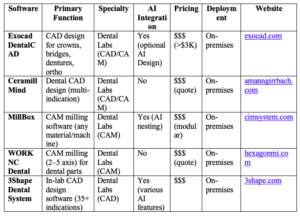
Buyer’s Guide for CAD/CAM for Dental Laboratories
Laboratory CAD/CAM suites focus on digital design and milling of crowns, bridges, dentures, veneers, etc. Leading packages emphasize user-friendly design and CAM automation. For example, Exocad’s DentalCAD is renowned for its open architecture (integrating any scanner, mill or printer) and extensive design tools. Amann Girrbach’s Ceramill Mind CAD uses an intuitive UI and workflow-guided modules (e.g. digital denture, implant bar design) within a validated milling ecosystem. CAM software like CIMsystem’s MillBox simplifies nesting (digital workflow) and toolpath generation for any material, even including AI-assisted high-production features. Hexagon’s WORKNC Dental provides 3–5 axis automated toolpaths tailored for dental milling (automated guide libraries, implant modules, etc.). 3Shape’s Dental System lab edition offers a broad indication library (crowns, ortho models, dentures, etc.) and built-in AI workflows (e.g. Model Builder Express) to speed up design.Buyer’s Guide for Implant Planning & Surgery Softwares
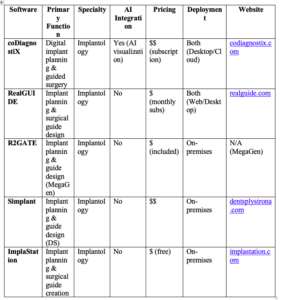
These tools handle DICOM (CBCT) data for implant placement and surgical guide design. They enable prosthetically driven planning and guide production. For example, coDiagnostiX (Straumann) is a full implant planning suite with AI-enhanced anatomy visualization (auto-segmentation, nerve detection) to improve safety. RealGUIDE(3DIEMME/ZimVie) is a cloud-capable platform that offers a free PLAN module and paid GUIDE/CAD modules; it supports full guide design and has open implant libraries. R2GATE by MegaGen provides intuitive implant planning with bone density analysis (Digital-EYE) – often included with MegaGen implant packages. Simplant (Dentsply Sirona) offers a comprehensive 3D guided implant workflow compatible with many implant systems. ImplaStation is a freeWindows/Mac app for DICOM viewing, implant planning and guide fabrication (multiple guide types).Buyer’s Guide for Softwares for Smile Design & Orthodontics
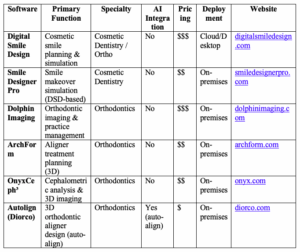
Smile design software and ortho programs enable aesthetic planning and tooth movement simulations. Solutions like Digital Smile Design (DSD) and Smile Designer Pro focus on veneers and cosmetic plans: using photos and geometric tools they quickly simulate “before & after” smiles for patient case acceptance. Orthodontic suites (2D/3D ceph, space analysis, aligner planning) include Dolphin Imaging (imaging and patient management for ortho), OnyxCeph³(cephalometric tracing), and aligner-specific tools like ArchForm and Autolign. ArchForm automates aligner setup from a scan, enabling in-office aligner production; it claims to “reduce your aligner bill by over 50%” while allowing same-day starts. Autolign (Diorco) uses auto-alignment algorithms to speed up 3D orthodontic setups. These tools improve efficiency in ortho cases and help practices grow by offering clear-aligner services in-house.Buyer’s Guide for Softwares for General Dental Offices
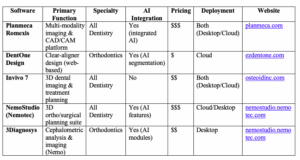
All-in-one practice platforms integrate imaging, CAD/CAM, and data management for general clinics. Planmeca Romexis is a leading example: it handles everything from 2D X-rays and intraoral scans to 3D CBCT in one system, with built-in AI for automating tasks (e.g. anatomy segmentation, implant planning). Users appreciate having all modalities side by side – “digital impressions, panoramic, intraoral or 3D images … all very intuitive”. Invivo 7 (Anatomage) is another comprehensive 3D imaging suite for clinics, used for CBCT analysis, case presentation and even collaboration via cloud-viewers. Other office-friendly software includes NemoStudio (Nemotec) for interdisciplinary planning (CEPH, airway, surgical, etc., with AI support). DentOne Design (by Diorco) and similar cloud-based aligner design apps let general practices create clear-aligner cases easily; DentOne, for instance, is free and uses AI-powered tooth segmentation to build aligner setups in seconds.Buyer’s Guide for Softwares for Diagnostics
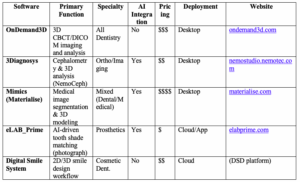
This category covers advanced imaging, analysis, and AI-assisted diagnostics. OnDemand3D (CyberMed) is a comprehensive 3D imaging solution for dentists and researchers, offering CBCT viewing, surgical simulation, orthodontic analysis and more. Materialise Mimics is a medical image analysis platform used for creating 3D models and guides from patient scans; it provides tools to “plan, design, and print models and guides for cases of any complexity”, with AI-enabled automatic segmentation. Shade-matching systems like eLABPrime use AI to analyze photos for exact tooth color matching. (Other tools, e.g. Digital Smile Design System or 3Diagnosys, offer further case analysis and esthetic planning, though implementation varies.)Sources
All performance and feature claims above are drawn from manufacturer information and industry publications, as cited. (Quotes are from published user testimonials and industry interviews.)Dental software comparison by practice need
A useful dental software comparison separates products by purpose. Practice management systems handle scheduling, billing, patient management and clinical records; imaging software supports radiographs and diagnostics; CAD/CAM tools support restorative workflows; and specialist platforms address implant planning, orthodontics or digital smile design.
| Software category | Core functions | Best suited to |
|---|---|---|
| Practice management | Scheduling, billing, charting, recalls and reports | General and multispecialty dental practices |
| Imaging software | Acquisition, viewing, measurement and integration | Clinics using digital radiography or CBCT |
| Cloud-based dental software | Remote access, updates, backup and multi-location use | Growing practices and distributed teams |
| CAD/CAM and design | Scanning, restoration design and manufacturing workflows | Digital restorative clinics and laboratories |
How to choose the right dental software
Shortlist systems using mandatory requirements, then test usability with real clinic scenarios. Review interoperability, migration, data ownership, security, downtime procedures, training and support before considering optional features.
Which dental software is best?
There is no universal winner. The best dental software is the system that reliably supports the practice’s clinical scope, team size, regulatory setting, budget and existing equipment.
Is free dental software suitable?
Free or open-source options may suit limited workflows, but clinics must still assess hosting, support, backups, security, updates and the cost of technical maintenance.
Dental software comparison criteria
Comparing software by brand name alone is unreliable because products serve different clinical and administrative purposes. Create a weighted scorecard based on mandatory workflows, then evaluate each system using the same demonstration script. This prevents attractive optional features from outweighing record quality, reliability, interoperability and support.
| Comparison area | Questions to test | Evidence to request |
|---|---|---|
| Clinical documentation | Does charting reflect the clinic’s procedures and terminology? | Live demonstration using a realistic case |
| Patient management | Can the team manage appointments, recalls and communication without duplicate records? | End-to-end patient workflow |
| Imaging | Can radiographs and photographs be opened from the correct record? | Compatibility list and sample integration |
| Billing | Are estimates, payments, refunds and outstanding balances traceable? | Financial reports and audit trail |
| Data portability | Can complete clinical and administrative data be exported? | Written export format and termination process |
| Security | Are access, backups, encryption and incidents managed transparently? | Security documentation and contractual commitments |
| Support | What response time applies to clinical downtime? | Service levels and customer references |
Software categories used in dental practices
Practice management systems
These systems combine appointments, patient records, dental charts, treatment plans, billing, reminders and reporting. Cloud-based dental software can simplify remote access and updates, while locally hosted systems may offer different control and infrastructure requirements.
Dental imaging software
Imaging platforms acquire, display and organize intraoral radiographs, panoramic images or CBCT data. Compare device compatibility, measurement tools, image export, diagnostic display and integration with the patient-management system.
CAD/CAM and laboratory software
Restorative workflows may require scanning, design, manufacturing and laboratory communication. Compatibility between scanners, file formats, milling machines, printers and laboratory systems is more important than using one brand across every step.
Specialty and patient-engagement software
Orthodontic, implant-planning, smile-design and patient-communication tools address narrower workflows. Determine whether the additional system solves a defined problem and whether data can return to the main patient record.
Cloud-based versus on-premise comparison
Cloud software commonly offers browser access, centralized updates and easier multi-location deployment. On-premise software may suit clinics with specific infrastructure or control requirements. Compare availability, internet dependency, backup responsibility, cybersecurity, hardware, technical support and long-term cost.
Pricing and total ownership cost
Compare setup, subscription, user licences, locations, storage, messaging, imaging modules, integrations, data migration, training, support and exit costs. A low advertised price can become expensive if necessary functions require separate modules or manual work.
How should a clinic shortlist dental software?
Define mandatory, desirable and optional requirements. Remove products that fail mandatory privacy, clinical-record or export requirements, then score the remaining options through structured demonstrations and reference checks.
Can one platform manage every dental workflow?
Some suites cover many functions, but specialist tools may still be required. The practical goal is a coherent workflow with reliable integration and a complete patient record, not the fewest possible applications.
Dental software trial and contract checklist
Use a time-limited pilot with representative users and real workflow scenarios before signing a long contract. Test new-patient registration, medical history, dental charting, imaging, treatment estimates, consent, payments, appointment rescheduling, recalls and record export.
The contract should define data ownership, hosting location, availability, backup, support hours, incident notification, price changes, termination and export assistance. Confirm whether integrations, messaging, storage, training and additional locations are included or billed separately.
How should software performance be reviewed?
After implementation, measure documentation time, appointment errors, duplicate records, billing corrections, recall completion, downtime and support response. Compare these outcomes with the pre-implementation baseline rather than relying only on staff impressions.
A structured comparison also helps the dental team distinguish essential workflow requirements from attractive but low-value features, reducing implementation risk and improving long-term adoption.