
Choosing the right CAM software is crucial for dental labs aiming for efficient milling of crowns, bridges, dentures, and implants. This article objectively compares hyperDENT, MillBox, and SUM3D on key factors for dental users. Each section focuses on one aspect of the workflow, summarizing strengths and considerations for each platform.
User Interface and Ease of Use
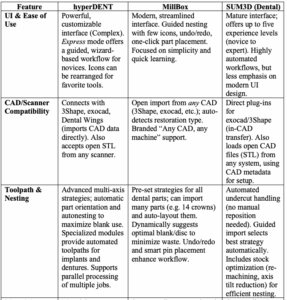
- hyperDENT: HyperDENT’s full version offers a highly flexible, customizable interface that appeals to experienced users. Its menus and settings are extensive, allowing advanced users to tailor workflows. However, it can be complex for beginners. In version 10, hyperDENT Express was introduced, where no deep CAM expertise is needed, making it fast for single-unit jobs.
- MillBox: MillBox was designed with ease-of-use in mind. Its modern interface drastically reduces on-screen clutter: secondary tools are tucked into collapsible menus and a guided workflow bar leads the user step-by-step. Industry reviewers note that MillBox is “extremely easy to use and very intuitive,” with one-click restoration placement (versus multiple clicks in older software) and undo/redo commands to recover from mistakes.
- SUM3D (Dental): SUM3D’s interface is mature but older in style. It emphasizes automation (automatically recognizing margins, insertion axes, etc.), but the UI has more buttons and levels which can overwhelm new users. It can be configured in up to five skill levels (novice to expert) to simplify the display for less experienced users.
Compatibility with CAD Systems and Scanners
- hyperDENT: HyperDENT provides built-in interfaces for major systems such as 3Shape, exocad, and Dental Wings. It can launch directly from 3Shape’s design software and import implant libraries and scanbody data from CAD. In practice, hyperDENT accepts standard open STL/CAM files from any CAD, so it works with scanned models from any intraoral scanner or design system.
- MillBox: MillBox is designed to accept designs from any dental CAD system - MillBox’s marketing lists “Any CAD, any machine, any material, any tool” as a key feature. In effect, this means MillBox can consume STL (or equivalent) outputs from 3Shape, exocad, Dental Wings, and other scanners without needing special format conversions.
- SUM3D (Dental): SUM3D also supports open data and direct CAD integration. It offers optional plugins that run inside exocad® and 3Shape®, enabling a one-click transfer from the CAD program to CAM. Even without plugins, SUM3D imports STL files from any CAD. It uses metadata from these files (including prep lines, insertion axes, etc.) to automate setup.
Toolpath Generation and Nesting Efficiency
- hyperDENT: hyperDENT offers advanced multi-axis toolpath strategies and extensive automation. For standard cases, it can automatically orient and nest parts in the blank to maximize material use. Its Auto-nesting feature places parts optimally as soon as the blank is selected, and a “local nesting” tool helps fine-tune positions. HyperDENT includes specialized modules (Implant, Denture, etc.) with pre-configured toolpaths: notably, it was “one of the first CAM systems to provide automated tool paths” for full dentures, allowing production of denture teeth or pre-milled sockets with minimal user input. In general, hyperDENT’s toolpaths are known for high precision surface finish, and it can simultaneously process multiple projects (running parallel CAM calculations) to boost throughput.
- MillBox: MillBox is built on the proven SUM3D engine but with user-friendly automation. It supports all common part types (crowns, copings, implant bars, etc.) with preset strategies. MillBox can import many parts at once (up to 14 files) and then auto-arrange them in the chosen blank. It even suggests the best blank (disc or block) to minimize waste: for example, it “will try to suggest the disc with the least amount of space remaining” that fits all restorations. MillBox also automates features like pin placement and margin detection. The 64-bit engine and constant updates have made its calculation speed very fast (users report that large arch cases now process much quicker than in older CAMs). In short, MillBox provides intuitive nesting tools, undo/redo, and intelligent blank management to make batch processing efficient.
- SUM3D (Dental): SUM3D was one of the first open CAMs for dental, so it has many dental-optimized toolpath features. It automatically detects undercuts and orients parts to eliminate manual repositioning. In fact, SUM3D advertises “no manual selection of curves needed” to identify milling areas, and no manual setup of holes – the system figures these out during import. It also offers advanced stock optimization: for example, it can re-machine partially used blanks, adjust axis tilt to reduce blank height, and apply autonaesting for material saving. Compared to MillBox, SUM3D does not have the newest GUI enhancements, but under the hood the toolpath strategies are similar (and MillBox essentially incorporates all of SUM3D’s core algorithms).
Material Support
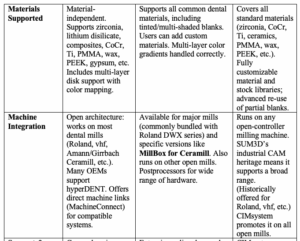
- hyperDENT: Follow-Me emphasizes that hyperDENT is “material-independent”. It supports all common dental materials: zirconia, lithium disilicate, ceramics, composites, CoCr, titanium, PMMA/acrylic, wax, PEEK, gypsum, and more. hyperDENT also handles multi-layer or pre-shaded blocks: it carries the color gradient of multi-layer blanks into the CAM view so you can position the restoration at the desired shade.
- MillBox: MillBox likewise supports the full range of dental materials and lets users add new ones as needed. In practice, one clicks the material group (e.g. zirconia, PMMA, wax) and MillBox automatically chooses appropriate tools and speeds. The system also accounts for material properties (e.g. color zones in a multi-layer block) so that the final restoration uses the intended shade gradient.
- SUM3D (Dental): SUM3D explicitly lists a comprehensive material library. It can mill zirconia, CoCr, titanium, lithium disilicate, ceramics, PMMA, wax, PEEK, fiberglass, composite, gypsum, and even newer multilayer or pre-shaded materials. Users may load custom stock profiles for any blank shape.
Integration with Milling Machines
- hyperDENT: hyperDENT is designed for “open architecture” CNC mills. It is compatible with virtually any dental milling machine that accepts external G-code or can be unlocked. In fact, Follow-Me partners with many mill manufacturers to create pre-tuned configurations. Additionally, hyperDENT offers MachineConnect, a direct interface for supported machines: it can launch jobs and even monitor machine status during CAM calculation. Overall, users report running hyperDENT on Roland, vhf, Hermle, Ceramill, and many other systems.
- MillBox: MillBox also runs on most open dental mills. It is often bundled by Roland for their DWX wet-milling systems, and there is a dedicated “MillBox for Amann Girrbach” edition for Ceramill Motion 2/3 mills. MillBox also works on Roland (DWX-4/42/52 etc.), Soricut, and other open controllers. In practice, any 4- or 5-axis mill that can load generic G-code can be used. Users of combined workflows (multiple brands of mills) may still operate multiple CAM seats, but MillBox’s flexible postprocessors and adapters cover a wide range of hardware.
- SUM3D (Dental): SUM3D, as CIMsystem’s legacy product, likewise targets any milling machine tool (even robots). Its industrial cousin is used on all kinds of machines, and the dental version comes in the same spirit. Historically, SUM3D has been sold for Roland, vhf, and many high-end mills. For SUM3D, the relevant takeaway is that it can be configured for any brand’s CAM post.
Free for members
Keep reading — it's free
The rest of this article is open to DentalReach members. Create a free account, or sign in, and every article on the site opens in full.